
MOD brewcode mods
On this page
Reminders
Claude Code 2.1.301+ Works on Team orgs brewmod-remindersTell Claude what to remember and when. The reminder is a Markdown file in your repo, so it outlives the session. When it fires, a band above the prompt shows it, and you run it with 1 or **.
Session cron jobs and /loop die with the session, and cloud /schedule has no access to your SSH keys, local scripts or VPS. A file-based reminder runs where you work, and only when you say so.
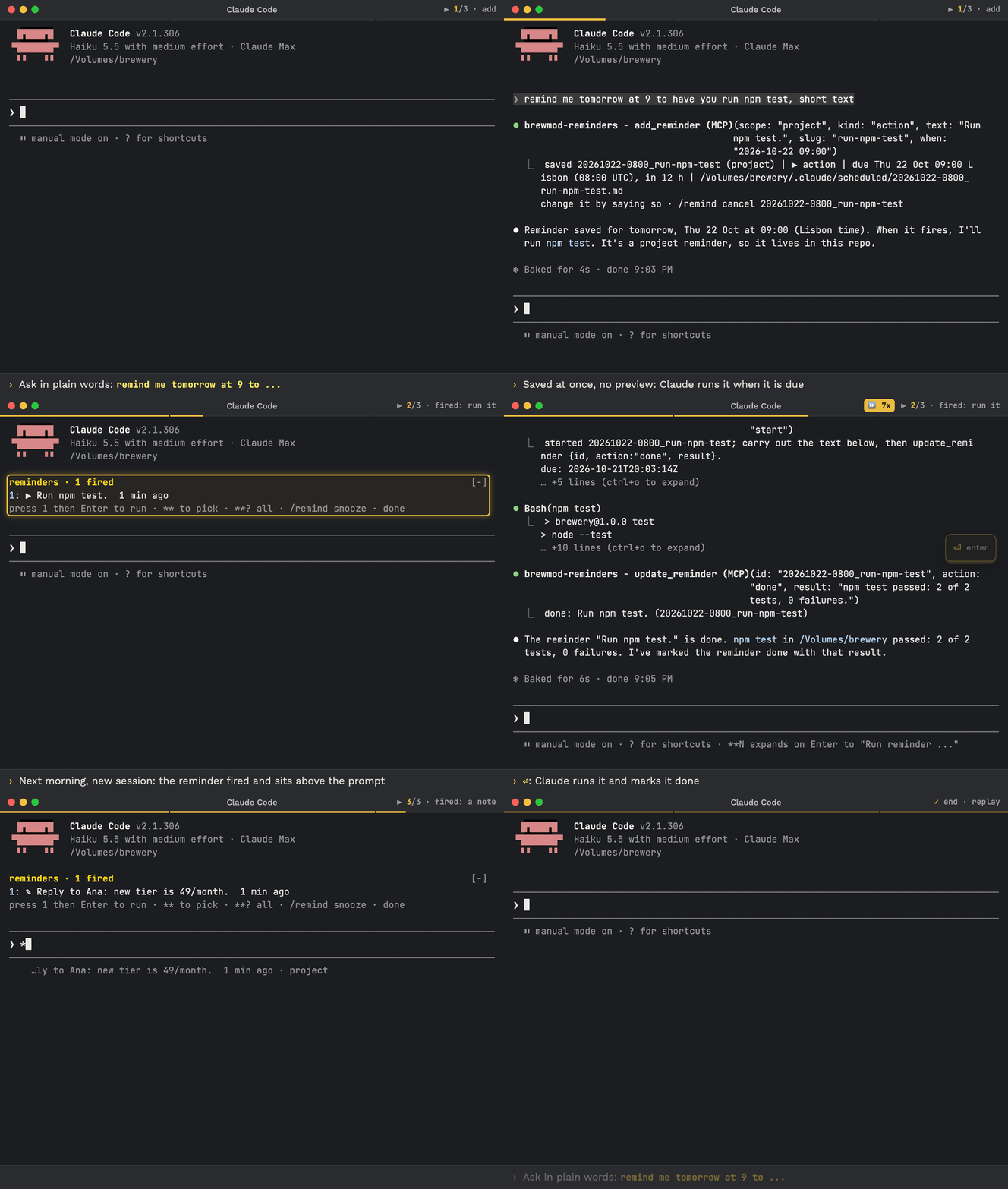
Recorded in a real Claude Code session, sped up where the title bar shows ⏩.
View README on GitHub (opens in a new tab)
Install
Update Claude Code first
The mods need Claude Code 2.1.301 or newer. Check with claude --version; if it is lower, run claude update, then restart Claude Code (exit, run claude).
Needs node on the PATH.
Install prompt- if Claude refuses, paste this into the chat
First run `claude --version`. The mods need Claude Code 2.1.301 or newer. If it is lower, stop and tell me to run `claude update`, restart Claude Code (type `exit`, then run `claude`) and paste this prompt again.

Execute these commands in this Claude Code session, one by one, show full output for each, do not skip any, do not summarize:

1. claude plugin marketplace add https://github.com/kochetkov-ma/claude-brewcode
2. claude plugin install brewmod-reminders@claude-brewcode

After all commands succeed, run `/reload-plugins`. If `/reload-plugins` is unavailable, tell me to type `exit` and run `claude` again. Run the commands now.
Run /reload-plugins afterwards.
Update, dev mode
Update prompt- if Claude refuses, paste this into the chat
First run `claude --version`. The mods need Claude Code 2.1.301 or newer. If it is lower, stop and tell me to run `claude update`, restart Claude Code (type `exit`, then run `claude`) and paste this prompt again.

Execute these commands in this Claude Code session, one by one, show full output for each, do not skip any, do not summarize:

1. claude plugin marketplace update claude-brewcode
2. claude plugin update brewmod-reminders@claude-brewcode

After all commands succeed, run `/reload-plugins`. If `/reload-plugins` is unavailable, tell me to type `exit` and run `claude` again. Run the commands now.
Dev mode without installing: claude --plugin-dir ./brewmod-reminders
Quick reference
| Field | Value |
|---|---|
| Command | /remind (keys run instantly, free text goes to Claude) |
| Picker | ** (fired and someday) and **? (every reminder) in the prompt; prefix is configurable |
| Kinds | action, note, someday |
| Scopes | project (default), global |
| Settings | prefix, cooldownMinutes, notify in /config; git in .claude/reminders.json |
| Requires | Claude Code 2.1.301+, node on the PATH |
How it works
You say what to remember and when, in plain words. The mod saves a file at once, with no preview and no permission prompt. When the time comes, the reminder is marked as fired and shown in a band above the prompt. You press 1, type **1, or answer Claude’s one-line note.
Three kinds cover everything you would put on a sticky note. An action is work for Claude, a note is a message to you, and someday is a thought with no date.
When to use
| Situation | What you say |
|---|---|
| Check something after a deploy | remind me tomorrow at 9 to check the prod logs and show me errors |
| Remember a task that is yours | remind me Friday to reply to Ana about pricing |
| Park an idea | someday try the new semble release |
| Need it in every project | remind me globally on Monday to renew the domain |
| See what is waiting | /remind all or what fires this week? |
Example scenarios
1. One reminder, from prompt to done
Create it by a plain prompt. Time passes. Open a session later and the band is already there.
❯ remind me tomorrow at 9 to check the prod logs after the hotfix and show me errors

saved 20261022-0800_check-prod-logs (project) | ▶ action | due Thu 22 Oct 09:00 Lisbon (08:00 UTC), in 17 h | …/.claude/scheduled/20261022-0800_check-prod-logs.md
change it by saying so · /remind cancel 20261022-0800_check-prod-logsreminders · 1 fired
1: ▶ check the prod logs after the hotfix and show me errors 20 min ago
press 1 then Enter to run · ** to pick · **? all · /remind snooze · done❯ what is 2+2?
A reminder came due: "check the prod logs after the hotfix and show me errors". Run it now, snooze it, mark it done, or cancel it?
2+2 is 4.❯ **1
update_reminder start, then the work, then update_reminder done
done: check the prod logs after the hotfix and show me errors (20261022-0800_check-prod-logs)
band is gone: nothing is fired2. Two reminders: run one, read one
Thursday 11:00. An action is picked with ** and run. A note is shown in full and closed.
reminders · 2 fired
1: ▶ check the prod logs after the hotfix and show me errors  2 h ago
2: ✎ Reply to Ana about pricing: the new tier is 49 per month  1 h ago

❯ **
**1  ▶ check the prod logs after the hotfix and show me errors   2 h ago · project
**2  ✎ Reply to Ana about pricing: the new tier is 49 per month   1 h ago · project
── someday ──
✎ try the new semble release   someday · project
**? all reminders · project + global❯ **?
── fired (2) ──
**1 ▶ check the prod logs after the hotfix and show me errors 2 h ago · project
**2 ✎ Reply to Ana about pricing: the new tier is 49 per month 1 h ago · project
── someday (1) ──
✎ try the new semble release someday · project
── history (1) ──
✓ ▶ renew the domain done 3 d ago · global❯ **1
done: check the prod logs after the hotfix and show me errors (20261022-0800_check-prod-logs)
❯ **2
Full text of the reminder:
✎ Reply to Ana about pricing: the new tier is 49 per month
This was just a reminder, so there was nothing to execute. Marking it done now.
done: Reply to Ana about pricing: the new tier is 49 per month (20261022-0900_reply-ana)3. Manage them
Thursday 11:00. The prod-logs action fired two hours ago, Ana’s action is due Friday, and one idea is parked.
❯ /remind all
Now: Thu 22 Oct 11:00 Lisbon (10:00 UTC)
Fired (1):
- 1 ▶ 20261022-0800_check-prod-logs | Thu 22 Oct 09:00 Lisbon (08:00 UTC), 2 h ago | check the prod logs after the hotfix and show me errors
Waiting (1):
- ▶ 20261023-0800_reply-ana | Fri 23 Oct 09:00 Lisbon (08:00 UTC), in 22 h | Reply to Ana about pricing: the new tier is 49 per month
Someday (1):
- ✎ someday_try-semble-release | no date (someday) | try the new semble release
project …/.claude/scheduled | global …/reminders

❯ /remind snooze 1 tomorrow 9:00
snoozed: check the prod logs after the hotfix and show me errors (20261022-0800_check-prod-logs) until 2026-10-23T08:00:00Z

❯ move the Ana reminder to a note for Monday
Reminder updated ▶ action → ✎ note · project · 20261023-0800_reply-ana
- ▶ project | Fri 23 Oct 09:00 Lisbon (08:00 UTC), in 22 h  Reply to Ana about pricing: the new tier is 49 per month
+ ✎ project | Mon 26 Oct 09:00 Lisbon (09:00 UTC), in 4 d  Reply to Ana about pricing: the new tier is 49 per month

❯ /remind done check-prod-logs
done: check the prod logs after the hotfix and show me errors (20261022-0800_check-prod-logs)

❯ /remind history
Now: Thu 22 Oct 11:00 Lisbon (10:00 UTC)
History (last 20) (1):
- ✓ ▶ 20261022-0800_check-prod-logs | done Thu 22 Oct 11:00 Lisbon (10:00 UTC), now | check the prod logs after the hotfix and show me errors
project …/.claude/scheduled | global …/reminders

❯ /remind reopen 20261022-0800_check-prod-logs tomorrow 9:00
reopened: check the prod logs after the hotfix and show me errors (20261022-0800_check-prod-logs) due 2026-10-23T08:00:00ZTimeline
- Wed 16:10, you ask
You say “tomorrow at 9 check the prod logs after the hotfix and show me errors”. It is saved as an action.
- Thu 09:00, it fires
The session is closed, so nothing happens yet.
- Thu 09:20, you open a session
The band reads
reminders · 1 fired. - 09:21, first prompt
Claude opens its reply with one line about the fired reminder, then answers your prompt.
- 09:22, you run it
Type
**1. Claude runs the action, closes it, and the band disappears. - Within the hour, no repeat
The line repeats at most once per
cooldownMinutes(60). A reminder that just fired is mentioned at once.
Kinds and scopes
| Kind | Mark | What it is for | What happens |
|---|---|---|---|
| action | ▶ | Work for Claude: “check the prod logs and show me errors” | Claude claims it, runs it when you say so, closes it with a one-line result |
| note | ✎ | A message to yourself: “build the CSV export” | Shown in full, Claude says it was just a reminder, closes it |
| someday | ▶ or ✎ (its kind) | A thought with no date, an action or a note: “someday try the new semble release” | Never fires. Not in the band, toast, alert or Claude’s line. Shown only when you ask: the /remind all Someday section, /remind someday, the ** picker (after a divider), the **? picker, or “anything to remind me?” |
Say “move it to Friday” and a someday item becomes a normal reminder.
| Scope | Where it lives | Shows in |
|---|---|---|
| project (default) | .claude/scheduled/ of the repo | Sessions of that project |
| global | ${CLAUDE_CONFIG_DIR:-~/.claude}/reminders/ | Every project on this machine, per Claude profile; never put in git |
Say “global” or “in every project”, or start with /remind global …, to pick global.
When you give no time, Claude asks one question, “When should it fire?”, with 2-3 options built from your request, each showing a concrete local time (a day-level answer such as “in 1 week” is saved at 09:00 local, never midnight), a “No date (someday)” option and Other. The kind or scope joins that dialog only when unclear.
When it fires
- Band. Above the prompt, only fired reminders:
reminders · N fired, rows like1: ▶ title 2 h ago(✎for notes,(global)suffix), up to 3 rows. With more, the footer adds+N more. Nothing fired, no band. - Session start. Open, resume and
/clearshow the band at once. - Idle open session. Within about a minute of the due time: the band, a toast
reminder fired: <title> · ** to pick, and a desktop alert. - Your next prompt. Claude starts its reply with one line about what fired, then answers. Notes are shown in full and closed.
Ways to talk to it
| Way | Example | What happens |
|---|---|---|
| Plain prompt | remind me tomorrow at 9 to check the prod logs | Claude creates it. Also answers anything to remind me? and what fires this week? |
/remind with free text | /remind check prod tomorrow 9:00 | Handed to Claude: create or answer. Start with global or project to fix the scope |
/remind with a key | /remind snooze 1 +1h | Instant, printed by the mod, no Claude turn |
** picker | **, **1, **1 **2 | Pick and run fired reminders; someday ones follow a divider |
**? picker | **? | Every reminder, project and global, grouped by state with counts |
| Band keys | 1, 2, 3 | Fill **N in an empty prompt; Enter runs it |
Pick and run with **
- Type
**to open the picker: fired reminders first, then a── someday ──divider and the someday ones. Each reminder row ends with· projector· global. Arrows plus Tab insert**1; Enter sends. - A bare
**ends with the row**? all reminders · project + global, which inserts**?; it is absent for**1or**pro. The rowno reminders · ask Claude "remind me ..."appears above it only when no reminder file with a known status exists in either folder. With only waiting or closed items, the bare**picker shows just the**?row. - Type
**?for everything: sections fired, running, waiting (with relative time), someday, unreadable and history, each with a count. History lists the 10 newest, then+N more · /remind history. Fired rows insert**N; running, waiting and someday rows insert**<id>; the other rows (dividers, unreadable, history) insert nothing new. - The same id open in both scopes inserts
**project:<id>or**global:<id>, so the right copy runs. - Bare
**plus Enter prints/remind all; bare**?plus Enter prints that and the newest history. No Claude turn. This applies to prompts typed in the terminal; prompts from Remote Control or the SDK pass through. - Type
**1directly.**1 **2runs both.**1 only the last houradds your words.**<id>works for any reminder, someday included. - Band keys: a digit
1to3typed into an empty prompt, then a pause of about 0.4 s while a reminder is fired, fills**1without sending. Enter runs it; ctrl+u undoes the fill. /remind run <N|id>does the same; so does saying “run the prod logs one”.**bold**text never expands. Change the prefix withprefixin/config.- Two sessions: only one runs a reminder. The other shows
<id> is already running in another session since <time>.
Commands
| Command | Result |
|---|---|
/remind | Fired reminders, numbered like the band |
/remind all [project|global] [today|tomorrow|week|+Nd|+Nw|until YYYY-MM-DD] | Sections Fired, Waiting, Someday. Fired are always listed; the window filters Waiting |
/remind history | Closed reminders (done, shown notes, cancelled), newest first |
/remind someday | Only the undated ones |
/remind run <N|id> [words] | Run an action, or show a note and close it |
/remind snooze <N|id> <when> | +1h, today or tomorrow (09:00, or add a time: tomorrow 9:00), a weekday (fri = next Friday 09:00, fri 14:00), YYYY-MM-DD (09:00 local) or YYYY-MM-DD HH:MM; gives a someday item a date |
/remind edit <N|id> <change> | Claude changes text, kind, time or scope and shows - … and + … lines. Claude keeps the old version: say “undo” and it restores it, including a move back between project and global |
/remind done <N|id> | You did it yourself |
/remind cancel <N|id> | Drop it |
/remind reopen <id> [when] | Bring a closed one back |
/remind help | Help text, and whether the desktop alert is on |
/remind [global|project] <any words> | Handed to Claude, which adds or answers |
Aliases: show active|all|done, list. The id is the file name without .md; a unique prefix of the slug also matches. Closed reminders are deleted after 30 days. With git set to commit or commit-push in .claude/reminders.json, expired project files are kept and Claude is asked to delete and commit them.
Settings
| Setting | Where | Default | Effect |
|---|---|---|---|
prefix | /config | ** | Picker and run token |
cooldownMinutes | /config | 60 | Minutes between offers in one session; a newly fired reminder is offered at once |
notify | /config | on | Desktop alert when a reminder fires in an open session |
git | .claude/reminders.json | off | off, commit or commit-push for the item file only |
Good to know
- Desktop alert. Needs a terminal with a notification channel: iTerm2, kitty or ghostty. Inside tmux nothing is sent.
/remind helpends with the current state. - Headless runs.
claude -p, CI, the SDK and subagents get no offer; prompts that start with/are skipped. - Team organizations. Checked live on a Team seat: band, offer through the bundled command hook,
/remindhand-off and the mod tools. - Worktrees and clones. Claims and status are per checkout. A tracked item marked done in one checkout shows pending in another until the change is pulled.
- Git is your call. The mod never runs git; with
commitorcommit-pushit tells Claude to commit, and push, only that item file..gitignoreis untouched. - Nothing runs unasked. A fired reminder is offered, never started on its own.
Technical details
Item file. <YYYYMMDD-HHMM>_<slug>.md (the prefix is the due time in UTC) or someday_<slug>.md. Header lines at the top, up to the first blank line (optional --- fences): due: 2026-10-22T08:00:00Z (UTC Z, or none), status: pending|done|cancelled, kind: action|note (missing means action), done: or cancelled: with a UTC time, optional created: and result:. The body is the text Claude runs or shows. A README.md in the folder is skipped. A time without Z is listed as unreadable with the hint to add Z. If the mod tools are unavailable, edit the header by hand: status: done plus done: <UTC>.
Claims. Starting an action writes .claims/<id>.json in its folder (the folder carries its own .gitignore with *), so a second open session cannot run it too. A claim from a crashed session expires after 6 h. Claude finishes with update_reminder done and a result, which sets status: done, done: and result:.
Tools Claude uses. list_reminders (scope, state active, all, someday or done, from, to), add_reminder (scope, when or someday, text, slug, kind, tz; saves at once; when is optional: called without it, the tool saves nothing, returns a short calendar of the next days and asks Claude to ask you once, so weekday options are right) and update_reminder (action start, done, snooze, cancel, edit or reopen, plus until, result, text, kind, when, scope, from_scope).
Migrating a hand-written hook. Items from a custom SessionStart hook (for example due-checks.sh with .claude/scheduled/*.md) parse unchanged. Remove the hook block from .claude/settings.json or .claude/settings.local.json and the script; while it is still registered, the offer reminds you to do so.
State. Session and offered marks live under the plugin root (.state/, pruned after 7 days). An update installs a new version directory, so a fired reminder can be offered once more.
How it works. A bundled command hook, hooks/remind.mjs, runs on UserPromptSubmit and on SessionStart with the compact matcher, so the offer reaches Claude on Team organizations, where a module’s own classic.* hooks are bypassed. The module draws the band, runs the tick, the picker and the /remind command, and registers the tools above. Every path fails open.
Related
Mods overview
Source on GitHub
Prompt placeholders
Plan-mode effort
Project page
Update: /brewtools:plugin-update, /reload-plugins, then /brewcode:setup-status upgrade - FAQ